
Your Shopping Cart


How to Improve Battery Life: The Professional Guide to Device Longevity in 2026
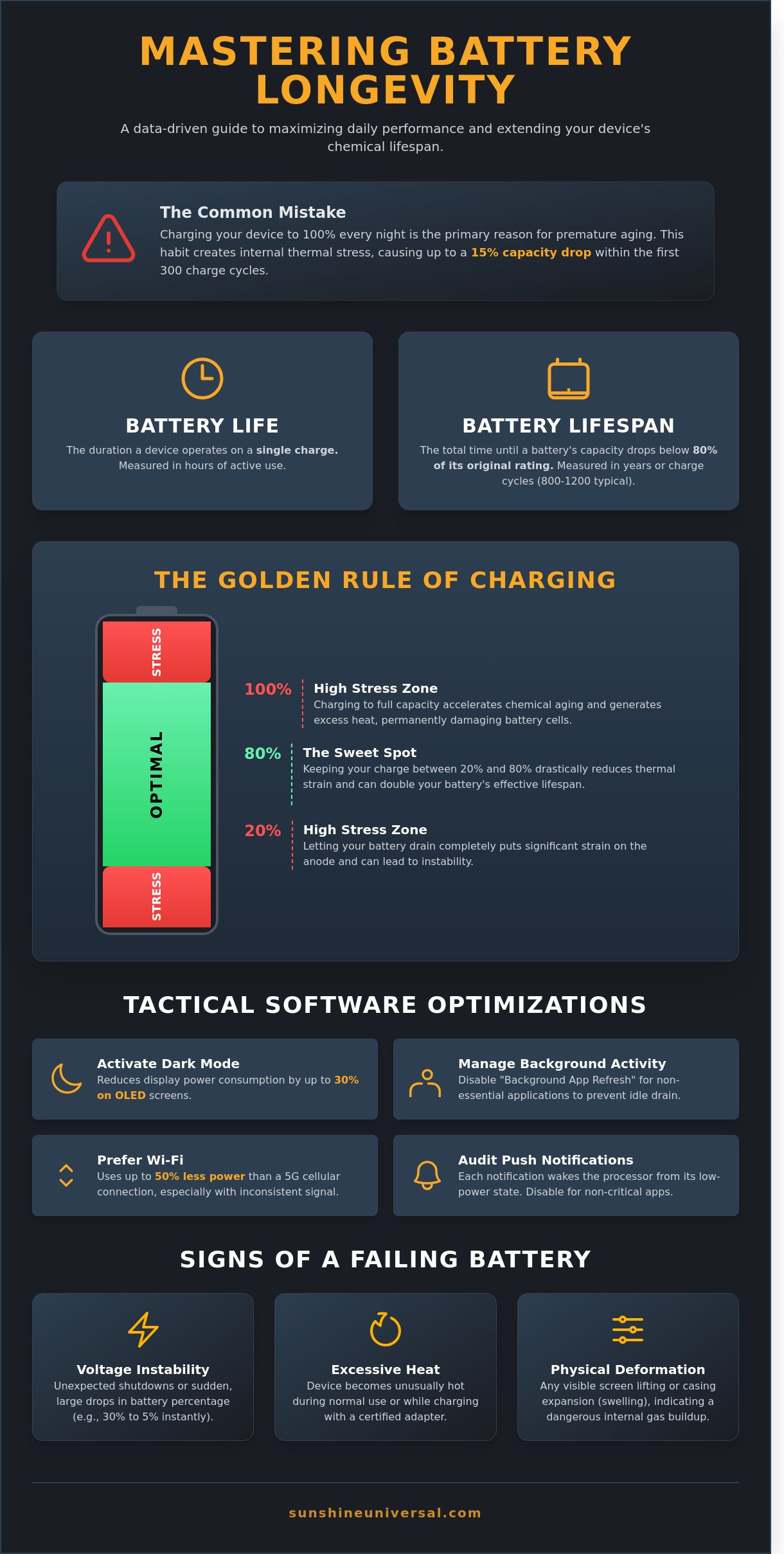
SUNSHINE.124Charging your smartphone to 100% every night is the primary reason your device's capacity often drops by 15% within the first 300 cycles. While it feels intuitive to start the day with a full tank, this habit creates internal thermal stress that compromises long-term stability. You've probably felt that mid-day anxiety when your screen brightness dims automatically at 2 PM, or wondered why your three-year-old tablet now requires a permanent tether to the wall. Mastering how to improve battery life isn't about luck; it's about applying a rigorous, data-driven approach to energy management and chemical preservation.
We've engineered this guide to provide a dual-strategy that secures both immediate runtime efficiency and extended hardware longevity for your professional toolkit. You'll learn to distinguish between temporary software fixes and the essential maintenance required to keep lithium-polymer cells healthy through 2026 and beyond. Our analysis includes a clear checklist for thermal regulation, charging thresholds, and calibration protocols. By following this structured methodology, you'll achieve reliable daily performance and successfully delay the need for costly hardware replacements.
Key Takeaways
- Distinguish between daily operational runtime and long-term chemical health to implement a comprehensive maintenance strategy for your electronic assets.
- Discover advanced software configurations and connectivity audits that demonstrate how to improve battery life through systematic power management.
- Learn to mitigate thermal degradation and apply the 20-80% charging protocol to ensure the structural integrity of your device’s lithium-ion cells.
- Master specialized optimization techniques for high-performance wearables to maintain peak efficiency in small-scale battery systems.
- Implement professional standards for hardware selection and long-term storage logistics to prevent permanent capacity loss during periods of inactivity.
Defining Battery Life vs. Battery Lifespan
Operational efficiency in the digital age requires a precise understanding of power management. Users often conflate two distinct metrics: battery life and battery lifespan. Battery life represents the total duration a device operates on a single charge cycle, measured in hours or minutes of active uptime. In contrast, battery lifespan refers to the total duration a cell remains viable before its chemical capacity falls below 80 percent of its original factory rating. Distinguishing between these two is vital for long-term hardware planning and global logistical stability.
Modern devices manufactured in 2026 utilize advanced chemical compositions to meet the demands of high-performance computing. Most of these units rely on the science of lithium-ion batteries to deliver high energy density in compact form factors. While these cells are robust, they're subject to unavoidable chemical aging. Professionals seeking how to improve battery life must first acknowledge that every charge and discharge action contributes to the eventual depletion of the hardware's total service years.
The Concept of Charge Cycles
A charge cycle is the total 100 percent discharge of capacity. This doesn't mean you must deplete the battery to zero in a single session. If you use 40 percent of your phone's capacity on Monday and 60 percent on Tuesday, you've completed exactly one cycle. Modern Li-ion cells in 2026 are typically rated for 800 to 1,200 full cycles before they show noticeable wear. Strategic partial charging is more effective than full discharges because it limits the thermal strain on internal components, which is a key factor in how to improve battery life over the long term.
Identifying Battery Degradation Signs
Maintaining a fleet of devices requires a systematic approach to identifying failures before they disrupt operations. Common indicators of a failing cell include:
- Voltage Instability: Unexpected shutdowns or rapid percentage jumps, such as a drop from 30 percent to 5 percent in seconds.
- Thermal Irregularities: Excessive heat during standard tasks or while the device is connected to a certified power source.
- Physical Deformation: Any signs of casing expansion or screen lifting, which indicate internal gas buildup and a high safety risk.
Professional diagnostic tools now provide State of Health (SoH) reports that quantify degradation with 98 percent accuracy. When a device's SoH falls below the 75 percent threshold, the risk of erratic behavior increases, necessitating a proactive replacement strategy to maintain operational continuity.
Tactical Software Optimizations for Daily Runtime
Software management dictates the operational efficiency of any mobile asset. Understanding how to improve battery life requires a granular look at how code interacts with hardware components. By 2026, AI-driven adaptive battery systems have reached a 95% accuracy rate in predicting user behavior; these systems throttle power to dormant processes before they can drain the cell. Implementing these tactical changes ensures that devices remain operational throughout demanding global schedules without frequent tethering to power sources.
Display and Visual Settings
OLED technology represents a fundamental shift in power dynamics. Unlike traditional LCDs that require a constant backlight, OLED panels allow individual pixels to remain completely inactive when displaying black. Utilizing Dark Mode can reduce display power consumption by up to 30% on professional grade devices. While auto-brightness is convenient, manual calibration often yields better results in stable office environments where light levels don't fluctuate. Reducing screen timeout intervals to 30 seconds provides immediate, measurable energy savings. Leading manufacturers offer specific protocols for maximizing battery performance through these precise visual adjustments.
Background Data and Syncing
Connectivity costs vary based on environment and protocol. Wi-Fi remains the most efficient transmission method, often consuming 50% less power than a 5G cellular connection when signal strength is inconsistent. Professional users should audit "Push" notifications and location services, as these triggers force the processor out of its low-power sleep state.
- Disable background app refresh for non-essential logistics or tracking tools.
- Switch email synchronization from "Push" to "Fetch" at 15-minute intervals.
- Deactivate "Always-On" listening for voice assistants to reduce microphone standby drain.
It's a common misconception that force-closing apps saves energy. In reality, modern operating systems are designed to freeze apps in RAM. Manually killing an app forces the CPU to reload data from flash storage during the next launch, which creates a significant energy spike. Just as we prioritize efficiency in global logistics and transport, your device's operating system is built to manage resources with a high degree of precision. Avoid interfering with these native management systems unless a specific application becomes unresponsive. Learning how to improve battery life is as much about what you stop doing as it is about the settings you change.
The Science of Chemical Preservation: Heat and Charging
Lithium-ion batteries rely on delicate chemical reactions that are highly sensitive to environmental variables. Heat acts as the primary catalyst for battery degradation. When internal temperatures exceed 30°C, the chemical breakdown of the electrolyte accelerates, leading to a permanent loss of capacity. Understanding how to improve battery life requires a disciplined approach to thermal management and voltage regulation. It's not just about how long a charge lasts, but how many hundreds of cycles the hardware can sustain before the chemistry fails.
The 20-80% rule is a foundational principle for preserving cell health. Maintaining a charge within this window reduces the physical stress on lithium ions. Charging a device to 100% forces ions into a high-voltage state, which strains the battery's internal structure over time. Conversely, allowing a device to hit 0% is dangerous. A deep discharge can cause the battery's protection circuit to trip, potentially rendering the device unable to take a charge again. Technical data on how to properly charge lithium-ion batteries confirms that avoiding these voltage extremes can double the effective lifespan of the component.
Optimal Temperature Ranges
The ideal operating window for consumer electronics is between 15°C and 25°C. Operating a smartphone or laptop in direct sunlight can quickly push internal temperatures above 45°C. This environment triggers thermal throttling, where the system intentionally slows down performance to mitigate heat. However, the battery still suffers chemical damage even if the software compensates. For long-term storage exceeding 30 days, devices should be kept at a 50% charge in a climate-controlled area to prevent capacity fade.
Charging Best Practices
Modern devices don't technically overcharge because they possess integrated protection circuits that halt the current. The real issue is the "trickle charge" effect during overnight sessions. When a phone stays plugged in at 100%, the charger repeatedly tops off the battery every time it drops a fraction of a percent. This constant high-voltage state can reduce total battery health by 15% over a 24-month period.
- Smart Plugs: Use a programmable timer to cut power once the device reaches 80% to automate preservation.
- Fast Charging: Limit the use of high-wattage chargers to emergencies, as they generate significantly more internal resistance and heat.
- Slow Charging: Standard 5W or 10W charging is the most stable method for how to improve battery life during sleep cycles.
Choosing a slower charging speed might seem inefficient, but the reduction in thermal stress ensures the hardware remains reliable for years rather than months. Consistency in these habits builds the stability that high-end electronics require to function at peak capacity.
Specialized Care for Smartwatches and Wearables
Wearable technology presents a distinct engineering challenge because of the physical constraints on battery size. While a standard smartphone might carry a 5,000 mAh cell, smartwatches typically rely on 200 to 500 mAh units. This limited capacity means that minor background processes have a disproportionate impact on total longevity. Users frequently seek guidance on how to improve battery life in these compact systems; the solution lies in managing high-frequency data polling and display settings. The 'Always-On' display feature is a primary power drain, often reducing total runtime by 35% depending on brightness levels. Disabling this feature and relying on the wake-up gesture can extend a single charge by an additional 12 to 18 hours.
T900 Ultra and Smartwatch Specifics
The T900 Ultra requires a strategic approach to power management to maintain its multi-day capability. One of the most effective methods involves disabling redundant health sensors. Many users don't require 24/7 blood oxygen or heart rate monitoring; switching these to manual checks can increase endurance by 40%. Additionally, watch face selection is critical. Since most modern wearables use OLED technology, choosing a watch face with a high percentage of true black pixels ensures that those specific LEDs remain off, conserving energy. For a deeper dive into technical specifications and optimization, refer to our T900 Ultra Feature Guide to maximize your device's operational efficiency.
Wireless Earbud Longevity
Bluetooth earbuds operate on a 'Case-to-Bud' power relationship that involves frequent micro-charging cycles. These cycles can accelerate chemical aging if the charging pins aren't maintained. Debris or skin oils on the gold-plated contacts create resistance, forcing the case to work harder and reducing charging efficiency by up to 15%. Cleaning these pins monthly with a microfiber cloth and 70% isopropyl alcohol ensures a stable power transfer.
When you aren't using your earbuds for periods exceeding 14 days, don't store them at 100% capacity. Keeping the lithium-ion cells at a 50% charge state during long-term storage prevents voltage stress. This practice is essential for maintaining the 30 to 60 mAh batteries found in the buds themselves. Understanding how to improve battery life through these maintenance routines ensures your audio hardware remains reliable for years. Consistent care prevents the common issue of one earbud draining faster than the other due to unbalanced cell degradation.
Optimize your device ecosystem by exploring our professional logistics and product solutions today.
Logistical Maintenance and Selection of Quality Hardware
Operational integrity depends on the physical components powering your fleet. SUNSHINE.124 applies a systematic approach to hardware selection, ensuring every component meets global standards for reliability. Understanding how to improve battery life begins with the infrastructure you use to deliver power. Substandard peripherals introduce variables that compromise chemical stability and shorten the operational lifecycle of expensive assets.
Cables and Power Delivery (PD)
Low-grade charging cables represent a significant risk to hardware health. These uncertified accessories often suffer from inconsistent gauge wiring, leading to voltage fluctuations exceeding 15% during peak draw. This instability generates internal heat, the primary catalyst for cell degradation. Standardizing on USB-C Power Delivery (PD) ensures a handshake between the charger and device, negotiating the precise wattage required. For a deeper technical analysis of hardware compatibility, see our Guide to USB Connections. Our global supply chain prioritizes cables with 99.9% conductivity ratings to maintain steady energy flow.
Long-term Storage Protocol
Devices entering a dormant state for 180 days or more require specific logistical handling to prevent permanent capacity loss. Storing a lithium-ion battery at 100% charge in a 25°C environment can result in a 20% permanent loss of capacity within 12 months. Conversely, a 0% charge state may lead to a deep discharge condition, rendering the cell unable to accept future charges.
'Proper storage at 50% charge preserves chemical stability for years.'
Always power down devices completely before storage. Standby mode continues to draw micro-currents that can deplete the cell over several weeks. We recommend a quarterly audit of stored hardware to ensure charge levels remain between 40% and 60%. This proactive measure is a critical component of how to improve battery life across a large inventory of devices.
SUNSHINE.124 remains committed to sourcing high-capacity components, specifically targeting cells with 5,000mAh or greater for mobile operations. We prioritize hardware with replaceable battery modules. This design choice extends the total utility of the device by 300% compared to integrated units. By selecting quality hardware and following strict maintenance protocols, organizations can significantly reduce their total cost of ownership and maximize device uptime across their global network.
Optimizing Power for the Next Generation of Performance
Transitioning from basic usage to professional device management requires a systematic approach. You've learned that maintaining a charge between 20% and 80% can extend a lithium-ion cell's functional life by up to 500 additional cycles. Software adjustments, such as disabling background refresh for non-essential 2026 era applications, provide immediate daily gains. Understanding how to improve battery life isn't just about settings; it's about the fundamental chemistry of your hardware. Professionalism in tech maintenance ensures that your tools remain operational when you need them most.
This focus on long-term health and sustainability is a principle that applies just as well to our living environments. For those interested in applying an eco-friendly approach to creating beautiful outdoor spaces, you can discover EcoShine Kft..
Real reliability stems from the intersection of user habits and manufacturing excellence. At Sunshine Universal, we ensure this stability through globally sourced premium components and a rigorous 48 point quality control process on all T900 Ultra models. Our commitment to your operational uptime includes 24/7 professional customer support to resolve any technical challenges instantly. High performance electronics shouldn't be a source of anxiety. By applying these preservation protocols, you're securing the longevity of your most vital professional tools.
Explore our collection of high-efficiency electronics at Sunshine Universal
Frequently Asked Questions
Is it better to charge my battery to 80% or 100%?
Charging to 80% is superior for long-term health. Lithium-ion batteries sustain 50% less voltage stress when maintained between 20% and 80% charge levels. Charging to 100% consistently accelerates chemical degradation over 400 charge cycles. Implementing this specific limit is a primary method to improve battery life across all portable electronics. Maintaining this range ensures the electrolyte remains stable and the internal resistance stays low for several years.
Does 'Fast Charging' damage my device's battery life?
Fast charging doesn't destroy batteries, but the resulting heat can. Modern 65W charging systems use a dual-phase approach. They deliver high current until 80% and then taper off to prevent overheating. If your device's internal temperature stays above 35°C during a charge cycle, the battery's lifespan decreases by 15% annually. Using certified hardware ensures the safety protocols manage these thermal loads effectively without compromising the cell's integrity.
Should I let my phone battery run to 0% occasionally?
You shouldn't let your battery reach 0% because deep discharges damage lithium-polymer chemistry. Modern cells don't suffer from the memory effect found in pre-2005 nickel-based batteries. A total discharge can trigger a safety disconnect that makes the battery impossible to recharge without professional equipment. Statistics show that avoiding 0% states can extend a battery's functional life by 250 cycles compared to frequent full depletions.
Can using a non-original charger ruin my battery?
A low-quality, non-original charger can definitely ruin your battery. While certified third-party brands are reliable, generic units often skip essential voltage regulators. A 2016 safety audit revealed that 99% of counterfeit chargers failed basic insulation tests. These substandard components deliver "dirty" power with high voltage ripples. This instability causes micro-fractures in the battery's cathode, leading to permanent capacity loss or even dangerous thermal events.
How do I know if my smartwatch battery needs to be replaced?
You'll know it's time for a replacement when the capacity falls below 80% of its factory specifications. Most smartwatches hit this mark after 1,000 full charge cycles, which is roughly three years of use. If your watch shuts down while the indicator still shows 15% power, the internal resistance has spiked too high. This hardware failure means the battery can't provide the surge current needed for basic operating system tasks.
Does Dark Mode actually save battery life on all screens?
Dark Mode only improves battery performance on devices with OLED or AMOLED screens. These displays turn off individual pixels to show black, which reduces power draw by 39% to 47% at peak brightness. Standard LCD screens use a backlight that remains fully lit regardless of the colors on the screen. For OLED users, utilizing dark themes is a proven strategy for how to improve battery life and extend daily usage times.
Why does my battery drain faster in cold weather?
Batteries drain faster in cold weather because low temperatures increase internal resistance and slow the movement of ions. At 0°C, a standard lithium-ion cell can lose 20% of its usable capacity instantly. If the temperature hits -20°C, that loss increases to 50%. The energy isn't permanently lost, but the chemical reaction becomes too sluggish to power the device. Always keep your electronics in an inner pocket to maintain a 20°C temperature.
Does leaving Bluetooth on all day significantly drain power?
Leaving Bluetooth enabled doesn't cause a significant drain on modern hardware. Bluetooth 5.0 and newer versions utilize Low Energy protocols that consume less than 0.01 watts when idle. This accounts for less than 1% of your total daily power usage. Even with a constant connection to a peripheral, the impact stays below 3% over 24 hours. You'll find that managing background app refresh saves far more power than toggling Bluetooth on and off.
